Table of Contents
Phishing emails targeting small businesses and freelancers are one of the fastest-growing cyber threats in the United States. Even cybersecurity professionals regularly receive sophisticated phishing attempts designed to steal login credentials and sensitive business data.
I manage a cybersecurity-focused website, use a custom domain email, and regularly analyze online threats. Yet, I still receive phishing emails pretending to be email providers, SharePoint, and secure document services. That alone should tell you one thing:
👉 If you run a small business or freelance in the US, you are a prime target.
In this article, I’ll break down real phishing emails I personally received, explain why attackers target domain email users, and show you how to spot phishing emails instantly—before damage is done.
Why Phishing Emails Targeting Small Businesses and Freelancers Are Increasing
Cybercriminals don’t only go after big corporations anymore. In fact, small businesses and freelancers are easier targets because:
- They rely heavily on email for clients, invoices, and contracts
- They often lack a dedicated IT or security team
- One compromised email can lead to financial fraud or data theft
According to the FBI’s Internet Crime Complaint Center (IC3), phishing is consistently the #1 reported cybercrime in the United States, costing billions annually.
(Source: https://www.ic3.gov)
If you own a custom domain email (like @yourbusiness.com), attackers automatically assume:
- You handle money
- You manage documents
- You have access to client data
That’s all they need.
Real Phishing Email #1: “Your Emails Have Been Put on Hold”
One phishing email I received claimed:
“Some of your incoming mails have been put on hold in the email server database due to a system glitch.”
This type of message is extremely common in email phishing attacks.
Below is a real phishing email I received on my cybersecurity domain email, pretending to be a mail server alert.
🚩 Red Flags to Notice Immediately
- Vague technical language (“server database glitch”)
- No mention of my actual email provider
- A “Sign in to view emails” button
- Fake urgency designed to create panic
Legitimate providers generally provide account alerts through official channels, so unexpected generic warnings should be verified carefully before you click any link.
Microsoft clearly states that they never ask for passwords via email.
(Source: https://www.microsoft.com/security)
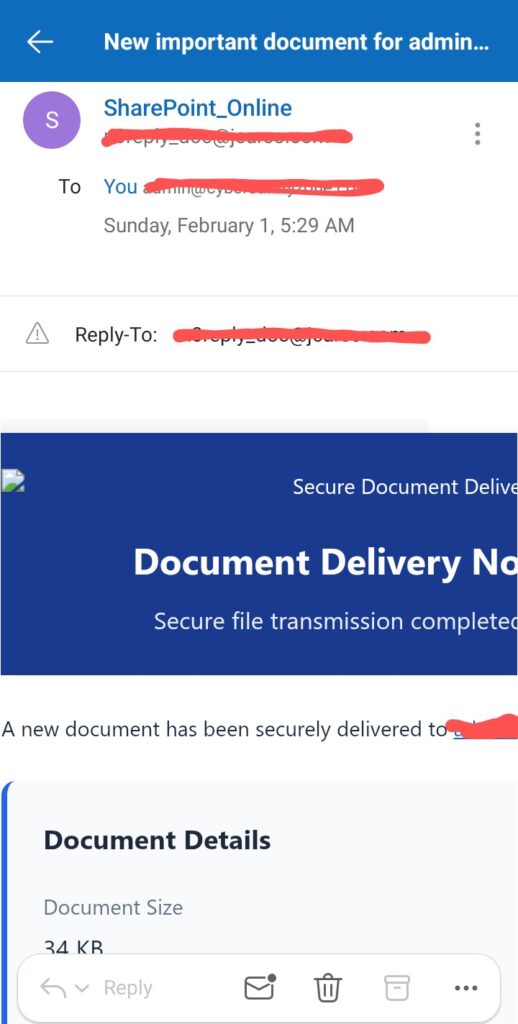
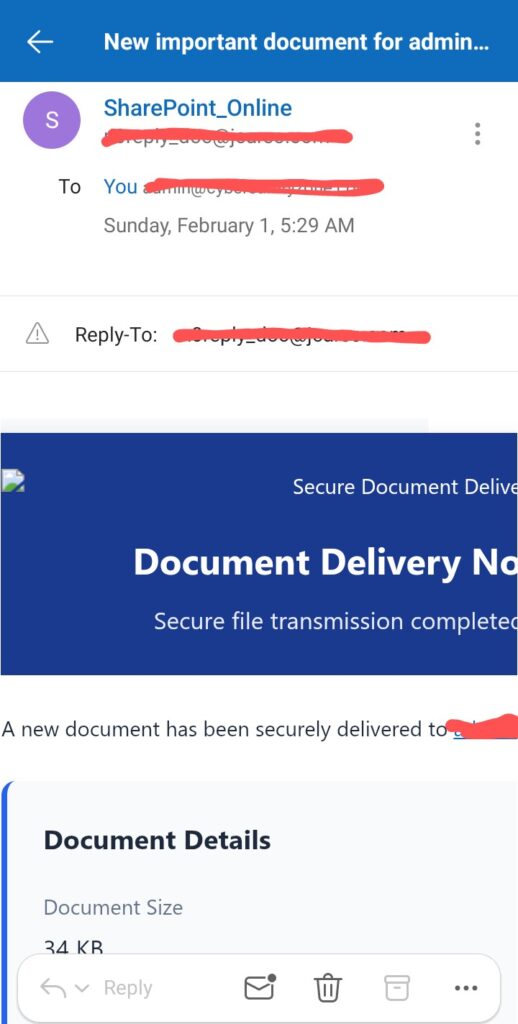
Real Phishing Email #2: Fake SharePoint Document Notification
Another email claimed a “secure document” had been delivered via SharePoint—even though I never requested or shared any document.
This screenshot shows a fake SharePoint document notification designed to steal Microsoft 365 login credentials.
🚩 Why This Is a Classic SharePoint Scam
- The sender domain was not Microsoft
- Display name said “SharePoint_Online” (easily spoofed)
- No sender name, company, or file context
- Clicking the link leads to a fake Microsoft login page
This attack aims to steal your Microsoft 365 email credentials, which attackers later use for:
- Invoice fraud
- Internal phishing
- Business email compromise (BEC)
The Cybersecurity and Infrastructure Security Agency (CISA) has warned extensively about these document-based phishing campaigns.
(Source: https://www.cisa.gov/phishing)
How to Identify Phishing Emails Targeting Small Businesses and Freelancers Instantly
Whether you’re a freelancer, consultant, or small business owner, use this 10-second phishing detection checklist:
1. Check the Sender’s Domain
Display names can be faked. Always inspect the actual email address.
✔ Legit: @microsoft.com
❌ Scam: random domains like @jcareo.com
2. Ask: Did I Expect This?
Did you:
- Request a document?
- Report an email issue?
- Initiate contact?
If the answer is no, assume phishing until proven otherwise.
3. Hover Over Links (Don’t Click)
Phishing emails often link to:
- Look-alike domains
- Random hosting services
- Credential harvesting pages
Google explains this technique clearly in its phishing prevention guide.
(Source: https://safety.google/phishing/)
4. Watch for Urgency and Fear
Phrases like:
- “Immediate action required”
- “Account suspended”
- “Emails on hold”
These are psychological triggers—not technical alerts.
5. Poor Context = Big Warning
Legitimate services include:
- Your name
- File names
- Organization details
- Support references
Generic emails don’t.
Why Even Cybersecurity Experts Receive Phishing Emails
This might surprise you, but phishing is not personal.
Attackers use automated tools that:
- Scrape websites for email addresses
- Buy email lists
- Target domain emails in bulk
They don’t care who you are—only that one person eventually clicks.
In fact, receiving phishing emails doesn’t mean you’re hacked.
It usually means:
- Your email is visible online
- Your business looks legitimate
- You’re active professionally
What US Small Businesses and Freelancers Should Do Next
To protect yourself long-term:
✅ Enable Two-Factor Authentication (2FA)
On:
- Email accounts
- Hosting panels
- Cloud tools
The National Institute of Standards and Technology (NIST) strongly recommends MFA for business accounts.
(Source: https://www.nist.gov)
✅ Regularly Check Email Rules
Attackers often create hidden forwarding rules after stealing credentials.
✅ Train Yourself (and Your Team)
Security awareness is your first defense—especially if you don’t have an IT team.
Final Thoughts on Phishing Emails Targeting Small Businesses and Freelancers
Phishing emails targeting small businesses and freelancers are no longer “obvious scams.” They are well-designed, emotionally manipulative, and increasingly convincing.
The good news?
You don’t need advanced tools to stay safe—just awareness, skepticism, and a few seconds of attention.
If a cybersecurity website owner can receive these emails, anyone can.
The difference is knowing how to spot them instantly.
Stay alert. Stay skeptical. Stay secure. 🔐
For a closer look at how AI is making phishing emails more convincing, read our guide to AI-generated phishing emails.