Table of Contents
If you’re wondering how to tell if your browser is hacked, you’re not alone. Freelancers and small business owners in the USA increasingly rely on web browsers to access client accounts, cloud storage, banking platforms, and project management tools. Unfortunately, cybercriminals know this and often target browsers through malicious extensions, browser hijackers, and malware.
Learning how to tell if your browser is hacked can help you detect threats before they steal sensitive client information or compromise your business accounts. In this guide, we’ll cover the most common warning signs and explain what you should do if your browser has been compromised.
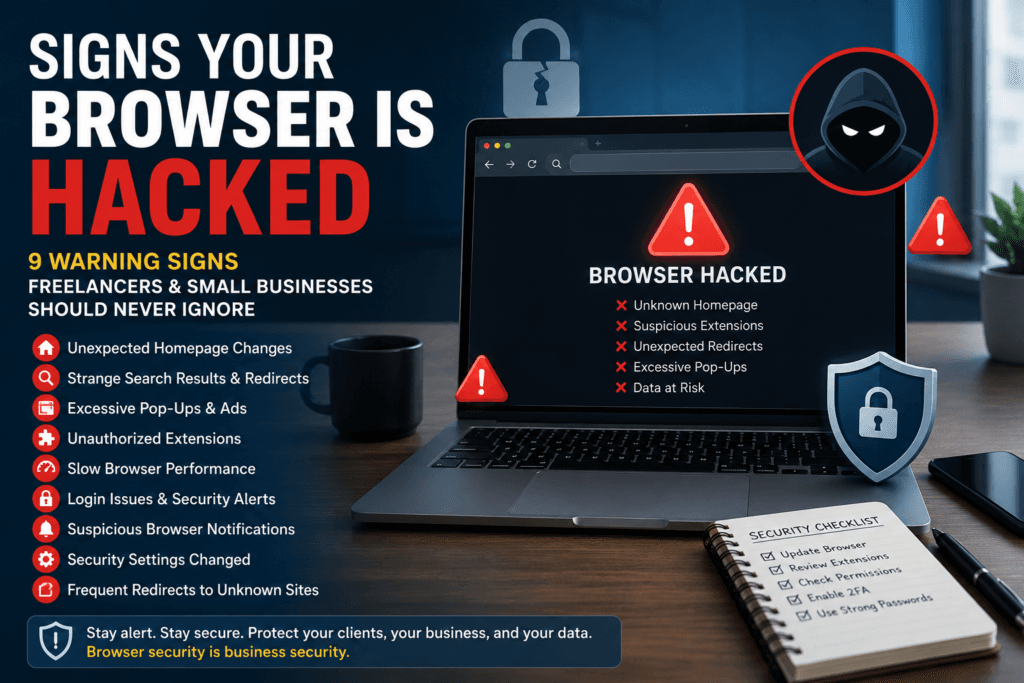
Your Homepage Changes Without Permission
One of the easiest ways to understand how to tell if your browser is hacked is to check whether your homepage has changed unexpectedly. Browser hijackers often modify browser settings and redirect users to websites that generate advertising revenue or collect personal information.If your browser opens a page you never selected, investigate immediately.
Search Results Are Being Redirected
Another common clue when learning how to tell if your browser is hacked is unusual search behavior.You may search through Google but end up redirected to an unfamiliar search engine. This often happens when malicious extensions alter your browser settings without your knowledge.
Watch for:
- Unexpected search engines
- Strange redirects
- Sponsored links appearing excessively
- Search results that look different than usual
- Excessive Pop-Ups Appear Everywhere
Frequent pop-ups are one of the strongest indicators of browser compromise.If you’re trying to learn how to tell if your browser is hacked, pay attention to websites suddenly displaying excessive advertisements, fake security warnings, or scam notifications.
These pop-ups may attempt to:
- Steal passwords
- Install malware
- Trick you into downloading fake software
- Collect personal information
How to Tell If Your Browser Is Hacked: Unknown Extensions Are Installed
Many browser attacks begin with malicious extensions.A key step in understanding how to tell if your browser is hacked is checking your installed extensions. If you notice unfamiliar add-ons, remove them immediately.
Cybercriminals often disguise harmful extensions as:
- Productivity tools
- AI assistants
- Coupon finders
- PDF converters
Review extension permissions carefully and install only trusted extensions.
Unauthorized browser extensions are one of the most common ways cybercriminals gain access to browsing activity. If you discover an unfamiliar extension, follow our step-by-step guide on How to Remove Malicious Chrome Extensions Safely to eliminate potential threats.
Browser Performance Suddenly Slows Down
Unexpected slowdowns can reveal hidden malicious activity.If your browser consumes excessive memory, freezes regularly, or crashes unexpectedly, it may be running unauthorized background processes.While performance issues do not always indicate hacking, they are often associated with malicious browser extensions and browser hijackers.
You Receive Suspicious Notifications
Suspicious browser notifications are another warning sign.You may suddenly receive messages claiming:
- Your device is infected
- You won a prize
- Your account needs urgent verification
- A payment has failed
These messages are commonly used in phishing campaigns targeting freelancers and small businesses.
Login Credentials Stop Working
One of the most serious warning signs is unexplained account activity.If passwords stop working or you receive unexpected password reset notifications, attackers may have gained access through browser-based malware.Immediately:
- Change affected passwords.
- Enable multi-factor authentication
- Remove suspicious extensions.
- Run a malware scan.
Stolen browser credentials can expose client accounts, cloud storage, and sensitive business information. Freelancers handling confidential data should also review our guide on How Freelancers Can Protect Client Data Without an IT Team.
Security Settings Change on Their Own
Cybercriminals often weaken browser defenses.If Safe Browsing, download protection, or privacy settings are disabled without your permission, your browser may have been compromised.Regularly review your browser’s security settings to ensure they remain properly configured.
How to Tell If Your Browser Is Hacked: Frequent Redirects Lead to Unknown Websites
Random redirects are among the clearest signs of browser hijacking.If clicking legitimate links sends you to unfamiliar websites, scammers may be manipulating your browser traffic for profit or data collection.For official browser security guidance, review recommendations from the Cybersecurity and Infrastructure Security Agency (CISA).
Browser security is only one part of a broader cybersecurity strategy. For a complete overview of protecting client information, passwords, devices, and online accounts, visit our Cybersecurity for Freelancers pillar guide.
Conclusion
Understanding how to tell if your browser is hacked is essential for freelancers and small businesses that depend on online tools every day. Warning signs such as homepage changes, browser redirects, suspicious notifications, excessive pop-ups, unknown extensions, and account login issues should never be ignored.
The faster you identify these problems, the easier it becomes to protect client information and prevent costly security incidents. By maintaining browser hygiene, reviewing extensions regularly, and following cybersecurity best practices, you can significantly reduce the risk of browser-based attacks.
FAQs
1. How can I tell if my browser is hacked?
Common signs include homepage changes, unexpected redirects, excessive pop-ups, unknown extensions, and unusual browser performance.
2.Can a malicious browser extension steal my passwords?
Yes. Some malicious extensions can monitor browsing activity, capture credentials, and collect sensitive information.
3. How do I remove a browser hijacker?
Remove suspicious extensions, reset browser settings, clear browsing data, and run a trusted malware scan.
4. Why do hackers target freelancers through browsers?
Freelancers often access client portals, cloud storage accounts, and payment platforms through browsers, making them attractive targets.
5. What should I do if I think my browser is hacked?
Remove suspicious extensions, update your browser, change passwords, enable multi-factor authentication, and scan your device for malware.