Table of Contents
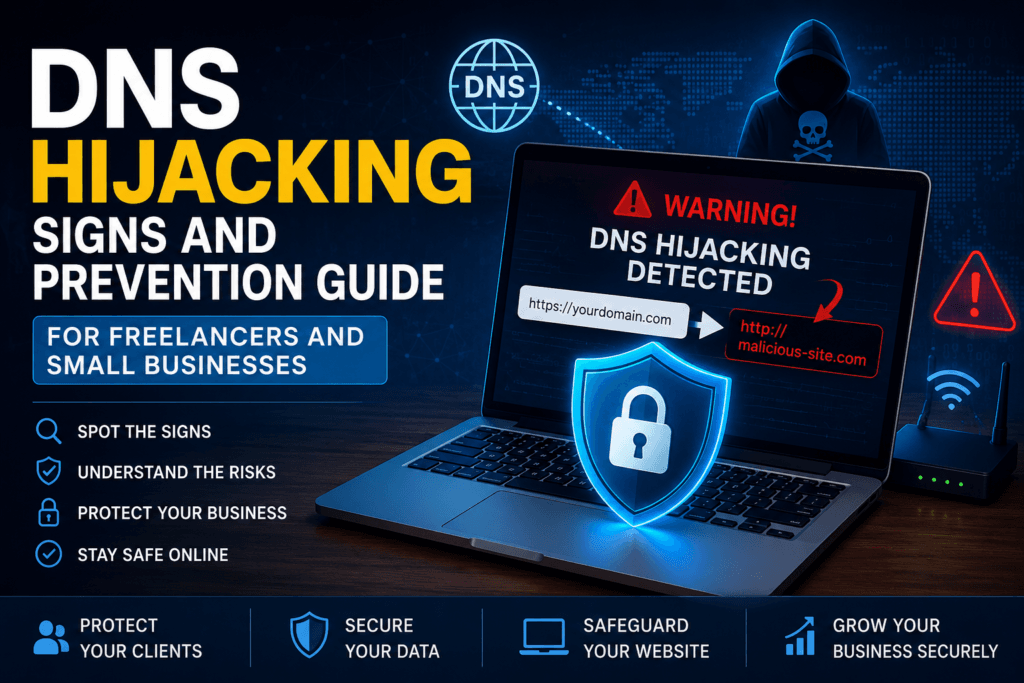
If your website suddenly starts loading the wrong pages, your employees receive strange login prompts, or customers complain about being redirected to suspicious websites, you may be dealing with a DNS attack. This DNS hijacking signs and prevention guide for freelancers and small businesses explains how to recognize the warning signs before attackers steal sensitive information or damage your reputation.
Many freelancers and small business owners in the United States rely on online tools for invoicing, client communication, cloud storage, and e-commerce. A successful DNS hijacking attack can redirect your web traffic to fake websites without your knowledge, allowing cybercriminals to steal passwords, payment details, or customer information.
The good news is that DNS hijacking is preventable. By understanding how it works and learning the early warning signs, you can significantly reduce your risk.
What Is DNS Hijacking?
The Domain Name System (DNS) works like the internet’s phonebook. Instead of remembering numerical IP addresses, you simply type a website name such as example.com, and DNS translates it into the correct server address.
DNS hijacking occurs when attackers manipulate this process. Instead of taking you to the legitimate website, your browser is secretly redirected to a malicious server controlled by criminals.
Unlike obvious malware infections, DNS hijacking often goes unnoticed because the fake website may look almost identical to the real one.
For freelancers and small businesses, this attack can lead to:
- Stolen business credentials
- Client data exposure
- Financial fraud
- Email compromise
- Loss of customer trust
- Website downtime
Why DNS Hijacking Signs and Prevention Guide for Freelancers and Small Businesses Matters
Many business owners believe hackers only target large corporations. Unfortunately, that’s no longer true.
Freelancers and small businesses often have:
- Limited cybersecurity budgets
- Default router passwords
- Outdated networking equipment
- Weak administrator credentials
- No dedicated IT security team
Cybercriminals know these organizations are easier to compromise, making DNS hijacking an attractive attack method.
If your business depends on cloud applications, online payments, or remote work, protecting your DNS settings should be part of your cybersecurity strategy.
DNS Hijacking Signs and Prevention Guide for Freelancers and Small Businesses: Common Warning Signs
Recognizing the warning signs early can prevent serious damage. Below are the most common indicators.
1. Websites Suddenly Redirect to Unexpected Pages
One of the biggest warning signs is being redirected to a completely different website.
For example, you type your bank’s web address correctly but land on an unfamiliar login page asking for your credentials.
Never enter passwords if something looks unusual.
2. Frequent Browser Security Warnings
Modern browsers warn users when certificates are invalid or websites appear unsafe.
If trusted websites suddenly display SSL certificate warnings, don’t ignore them.
Although certificate errors can have legitimate causes, repeated warnings across multiple websites may indicate DNS manipulation.
3. Slow or Unusual Internet Behavior
DNS hijacking sometimes causes:
- Slow website loading
- Failed connections
- Random connection timeouts
- Websites opening differently on different devices
If only one device experiences these issues, malware may be responsible. If every device on your office network shows similar problems, check your router and DNS settings.
4. Login Pages Look Different
Attackers often create convincing copies of:
- Microsoft 365
- Google Workspace
- Banking portals
- PayPal
- Cloud storage services
Even small changes in fonts, colors, or URLs should raise suspicion.
5. Employees Receive Unexpected Password Requests
If multiple employees suddenly receive login prompts for services they already use every day, someone may be attempting credential theft through DNS redirection.
Always verify the website address before signing in.
6. Your DNS Settings Change Without Permission
Many attacks modify:
- Router DNS settings
- Computer DNS configuration
- Browser DNS preferences
If you notice unfamiliar DNS server addresses that nobody in your organization configured, investigate immediately.
DNS Hijacking Signs and Prevention Guide for Freelancers and Small Businesses: How Cybercriminals Hijack DNS
Understanding how attacks happen helps you prevent them.
Compromised Home or Office Router
Many routers still use default usernames and passwords.
Once attackers gain access, they replace legitimate DNS servers with malicious ones, affecting every connected device.Since compromised routers are a common cause of DNS hijacking, it’s important to recognize the router hacking signs and fix security issues before attackers can redirect your internet traffic.
Malware Infection
Certain malware families silently change your computer’s DNS settings after infection.
This allows attackers to redirect web traffic even when the router remains secure.
Compromised Registrar Account
If hackers gain access to your domain registrar account, they may modify your domain’s DNS records.
This is one of the most dangerous forms of DNS hijacking because visitors are redirected before they even reach your hosting provider.
Public Wi-Fi Attacks
Freelancers frequently work from coffee shops, airports, hotels, and coworking spaces.If you frequently work from coffee shops, airports, or coworking spaces, learn how to stay safe on public Wi-Fi to reduce the risk of DNS hijacking and other cyber threats
An unsecured public Wi-Fi network can expose users to rogue DNS servers controlled by attackers.
Using a trusted VPN on public Wi-Fi significantly reduces this risk.
DNS Hijacking Signs and Prevention Guide for Freelancers and Small Businesses: Prevention Tips
Now that you know the warning signs, let’s look at the practical steps you can take to reduce the risk of DNS hijacking.
1. Secure Your Router
Your router is often the first target in a DNS hijacking attack.
Protect it by:
- Changing the default administrator username and password.
- Installing the latest firmware updates.
- Disabling remote management if you don’t need it.
- Using a strong, unique password for the admin panel.
Even if you work from home, your router protects every device connected to your network.
2. Use Trusted DNS Providers
Avoid using unknown or suspicious DNS servers.
Well-known providers generally offer better security features and reliability. Examples include:
- Cloudflare DNS (1.1.1.1)
- Google Public DNS (8.8.8.8)
Choose a trusted provider and verify that your router or computer hasn’t been changed to an unfamiliar DNS server.
3. Enable Multi-Factor Authentication (MFA)
If an attacker gains access to your domain registrar account, they can modify your DNS records.
Protect important accounts—including your domain registrar, hosting provider, and business email—with multi-factor authentication (MFA). This adds an extra layer of security even if your password is stolen.
4. Keep Devices Updated
Operating system and browser updates often fix security vulnerabilities that attackers exploit.
Enable automatic updates for:
- Windows or macOS
- Web browsers
- Router firmware
- Antivirus software
Small businesses frequently delay updates, but doing so increases the risk of compromise.
5. Be Careful on Public Wi-Fi
Freelancers often work from cafés, airports, hotels, and coworking spaces.
When using public Wi-Fi:
- Avoid logging into sensitive business accounts unless necessary.
- Use a trusted VPN.
- Confirm the network name with staff before connecting.
- Disable automatic Wi-Fi connections.
These habits reduce the chance of connecting to a malicious network.
6. Monitor Your Domain Regularly
If you own a business website, regularly review your DNS records through your domain registrar.
Look for unexpected changes to:
- A records
- CNAME records
- MX records
- Name servers
If something changes without your approval, investigate immediately.
DNS Hijacking Signs and Prevention Guide for Freelancers and Small Businesses: What to Do If You Suspect an Attack
Quick action can minimize damage.
Step 1: Disconnect From the Network
If multiple devices behave suspiciously, disconnect them from the internet until you identify the cause.
Step 2: Check Your DNS Settings
Review the DNS configuration on:
- Your computer
- Your router
- Your business firewall
If you find unfamiliar DNS server addresses, replace them with your trusted provider.
Step 3: Change Important Passwords
Update passwords for:
- Business email
- Domain registrar
- Web hosting
- Banking accounts
- Cloud services
Enable MFA if it isn’t already active.
Step 4: Scan for Malware
Run a full security scan using reputable antivirus or endpoint protection software to detect malware that may have changed your DNS settings.
Step 5: Contact Your Hosting Provider or IT Support
If your business website is affected, contact your hosting provider immediately. They can help verify that your DNS records and hosting configuration haven’t been altered.
Best Practices to Stay Protected
Make these habits part of your cybersecurity routine:
- Use strong, unique passwords for all business accounts.
- Enable MFA wherever possible.
- Keep software and firmware updated.
- Train employees to recognize suspicious login pages.
- Review DNS settings periodically.
- Back up important business data regularly.
Following these practices greatly reduces the likelihood of becoming a victim of DNS hijacking.
Learn More About DNS Security
The U.S. Cybersecurity and Infrastructure Security Agency (CISA) offers practical guidance on protecting networks and reducing cyber risks for organizations of all sizes. Their resources are an excellent starting point for improving your cybersecurity posture.
Frequently Asked Questions
1.What is the biggest sign of DNS hijacking
Unexpected website redirects, fake login pages, and unexplained DNS setting changes are among the most common warning signs.
2.Can DNS hijacking steal passwords?
Yes. Attackers can redirect you to convincing fake websites that collect usernames, passwords, and other sensitive information.
3.Are freelancers at risk of DNS hijacking?
Yes. Freelancers often work remotely and use public Wi-Fi or home routers, making them attractive targets if proper security measures aren’t in place
4.How can I check if my DNS has been changed?
Yes. Attackers can redirect you to convincing fake websites that collect usernames, passwords, and other sensitive information.
5.Does using a VPN prevent DNS hijacking?
A trusted VPN can reduce the risk of DNS manipulation on public networks by encrypting your internet traffic. However, it should be combined with other security measures such as MFA, software updates, and secure router settings.
Conclusion
Recognizing the DNS hijacking signs and prevention guide for freelancers and small businesses is essential for protecting your online business. While DNS hijacking can quietly redirect your traffic and expose sensitive information, a proactive security strategy can significantly reduce the risk.
By securing your router, enabling multi-factor authentication, monitoring your DNS settings, keeping your devices updated, and staying alert for unusual website behavior, you can protect your business, your clients, and your reputation from this growing cyber threat.
DNS security is just one part of protecting your business. For more practical tips, explore our comprehensive cybersecurity guide for freelancers and small businesses to strengthen your overall cybersecurity strategy