Table of Contents
Introduction
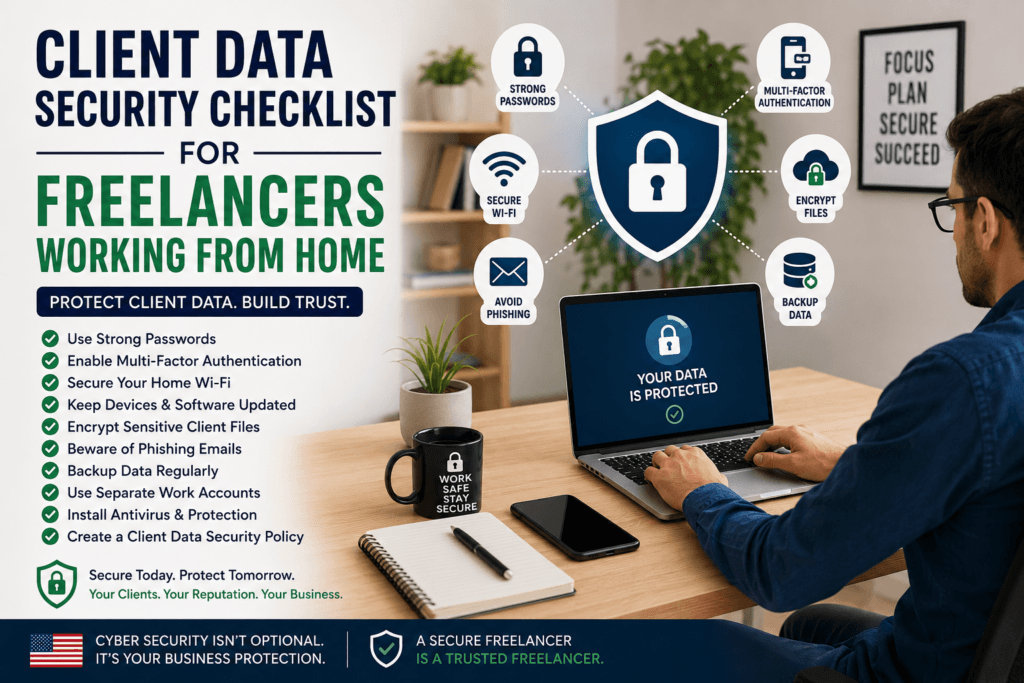
Client data security checklist for freelancers working from home is essential for freelancers in the United States who are handling more sensitive client information than ever before. From login credentials and payment records to customer databases and confidential business files, remote freelancers are now prime targets for cybercriminals. A single security mistake can damage your reputation, lead to loss of client trust, and even expose you to legal risks.
That’s why having a client data security checklist for freelancers working from home is no longer optional. Whether you are a freelance writer, developer, designer, marketer, or virtual assistant, protecting client information should be part of your daily workflow.
In this guide, you’ll learn practical cybersecurity steps every freelancer can follow to secure client data while working remotely.
Why Client Data Security Matters for Freelancers
Many freelancers believe hackers only target large corporations. In reality, small businesses and independent contractors are often easier targets because they usually have weaker security systems.
When you work with U.S.-based clients, they expect professional handling of sensitive data. If client information gets leaked because of poor cybersecurity practices, you could face:
- Loss of clients
- Contract termination
- Reputation damage
- Legal liability
- Financial losses
According to the Cybersecurity & Infrastructure Security Agency (CISA), remote workers should follow strict security practices to reduce cyber risks while working from home.
Implementing a strong client data security checklist for freelancers working from home helps build trust and protects your freelance business from cyber threats.
1. Use Strong Passwords for Every Client Account
One of the biggest mistakes freelancers make is reusing passwords across platforms. If one account gets compromised, hackers can access multiple systems.
To improve security:
- Use unique passwords for every client tool
- Create passwords with at least 12–16 characters
- Include uppercase letters, numbers, and symbols
- Avoid predictable words or birthdays
A password manager can help store and generate secure passwords safely.
Popular password managers include:
You can also strengthen your workflow with this resource:
👉 Password Security Tips: https://cybersafetyzone.com/password-security-tips
Strong password management is a critical part of any client data security checklist for freelancers working from home.
2. Enable Multi-Factor Authentication (MFA)
Even strong passwords are not enough anymore. Multi-factor authentication adds another layer of protection by requiring a second verification step.
Enable MFA on:
- Email accounts
- Cloud storage
- Client dashboards
- Payment platforms
- Project management tools
Authentication apps are safer than SMS verification.
Recommended apps include:
For freelancers handling sensitive files, MFA is one of the simplest ways to prevent unauthorized access.
3. Secure Your Home Wi-Fi Network
Your home internet connection is the gateway to all your client work. An unsecured Wi-Fi network can expose confidential information to attackers.
To secure your home network:
- Change the default router password
- Use WPA3 or WPA2 encryption
- Hide your Wi-Fi network name if possible
- Update router firmware regularly
- Avoid using public Wi-Fi without protection
For a detailed setup guide, see:
👉 Secure Home Wi-Fi Guide: https://cybersafetyzone.com/secure-home-wifi-guide
A secure connection is a must-have in every client data security checklist for freelancers working from home.
If you frequently work in cafes or coworking spaces, use a VPN to encrypt your internet traffic.
Trusted VPN providers include:
A secure internet connection is essential in any client data security checklist for freelancers working from home.
4. Keep Devices and Software Updated
Outdated software often contains vulnerabilities hackers can exploit.
Always update:
- Operating systems
- Browsers
- Antivirus tools
- Plugins
- Video conferencing apps
- File-sharing software
Enable automatic updates whenever possible.
The Federal Trade Commission (FTC) recommends keeping devices updated to protect personal and business information from cyber threats.
Freelancers who delay updates increase the risk of malware infections and data breaches.
5. Encrypt Sensitive Client Files
Encryption converts data into unreadable code that only authorized users can access.
You should encrypt:
- Financial documents
- Client contracts
- Password spreadsheets
- Customer information
- Business reports
Cloud services with encryption features include:
For extra protection, avoid sending sensitive files through unsecured email attachments.
Encryption strengthens your client data security checklist for freelancers working from home and demonstrates professionalism to clients.
6. Be Careful With Phishing Emails
Phishing attacks target freelancers because remote workers often communicate through email daily.
Warning signs include:
- Urgent requests for login details
- Suspicious links
- Unexpected invoices
- Fake file-sharing notifications
- Misspelled email domains
Before clicking anything:
- Verify the sender’s email
- Hover over links
- Confirm requests directly with clients
The National Institute of Standards and Technology (NIST) provides cybersecurity guidance for businesses and remote workers to reduce phishing risks.
Cybercriminals constantly evolve their tactics, making awareness essential.
7. Backup Client Data Regularly
Hardware failures, ransomware, and accidental deletion can destroy important files instantly.
Freelancers should follow the 3-2-1 backup rule:
- Keep 3 copies of data
- Store backups on 2 different devices
- Keep 1 backup offsite or in the cloud
Reliable backup tools include:
Regular backups help freelancers recover quickly after cyber incidents.
8. Use Separate Work and Personal Accounts
Mixing personal and client activities increases security risks.
Best practices include:
- Use separate browsers for work
- Create dedicated work email accounts
- Avoid downloading personal files on work devices
- Separate client folders from personal storage
This minimizes accidental exposure of sensitive information.
For freelancers managing multiple clients, separation improves organization and security simultaneously.
9. Install Reliable Antivirus and Endpoint Protection
Antivirus software helps detect malware, ransomware, and malicious downloads before they cause damage.
Trusted cybersecurity tools include:
Freelancers working from home should schedule automatic scans and monitor suspicious device activity regularly.
10. Create a Client Data Security Policy
Even solo freelancers benefit from having written security procedures.
Your policy should include:
- Password management rules
- File-sharing practices
- Backup schedules
- Device security requirements
- Incident response steps
A documented security policy reassures clients that you take data protection seriously.
For U.S. freelancers working with small businesses, this can become a competitive advantage.
Conclusion
Cybersecurity is now a core responsibility for remote freelancers. Clients expect their confidential data to remain protected, regardless of whether they hire a large agency or an independent contractor.
Following this client data security checklist for freelancers working from home can significantly reduce the risk of data breaches, phishing attacks, ransomware, and account compromise.
For a deeper understanding of full protection strategies, see our complete guide on Freelancer Cybersecurity Guide where we break down advanced steps to secure your workflow, tools, and client communication end-to-end.
Simple actions like enabling MFA, securing Wi-Fi, encrypting files, and updating software can protect both your freelance business and your clients’ trust.
As cyber threats continue to evolve, freelancers who prioritize security will stand out as reliable professionals in the competitive U.S. freelance market.
FAQs
1.What is the best way for freelancers to protect client data while working from home?
The best approach is combining strong passwords, multi-factor authentication, encrypted storage, secure Wi-Fi, and regular backups. Using a complete client data security checklist for freelancers working from home helps reduce security risks significantly.
3. Is public Wi-Fi safe for freelancers?
Public Wi-Fi can expose your data to hackers. Freelancers should avoid accessing sensitive client accounts on public networks unless they use a trusted VPN.
4. Why is MFA important for freelance cybersecurity?
Multi-factor authentication prevents unauthorized access even if your password gets stolen. It adds an extra security layer to important accounts.
5.Can small freelance businesses become targets for hackers?
Absolutely. Cybercriminals often target freelancers and small businesses because they usually have weaker security compared to large companies.
6.What should freelancers do after a data breach?
Freelancers should immediately change passwords, notify affected clients, scan devices for malware, restore backups if needed, and review security weaknesses to prevent future incidents.